Showing posts with label in. Show all posts

3 2 1 Code in Inviting teens to contribute to open source

| 0 comments |

Code-in 2014 logo

We believe that the key to getting students excited about computer science is to give them opportunities at ever younger ages to explore their creativity with computer science. That’s why we’re running the Google Code-in contest again this year, and today’s the day students can go to the contest site, register and start looking for tasks that interest them.


Ignacio Rodriguez was just 10 years old when he became curious about Sugar, the open source learning platform introduced nationally to students in Uruguay when he was in elementary school. With the encouragement of his teacher, Ignacio started asking questions of the developers writing and maintaining the code and he started playing around with things, a great way to learn to code. When he turned 14 he entered the Google Code-in contest completing tasks that included writing two new web services for Sugar and he created four new Sugar activities. He even continued to mentor other students throughout the contest period.  His enthusiasm for coding and making the software even better for future users earned him a spot as a 2013 Grand Prize Winner.


Ignacio is one of the 1,575 students from 78 countries that have participated in Google Code-in since 2010. We are encouraging 13-17 year old students to explore the many varied ways they can contribute to open source software development through the Google Code-in contest. Because open source is a collaborative effort, the contest is designed as a streamlined entry point for students into software development by having mentors assigned to each task that a student works on during the contest. Students don’t have to be coders to participate; as with any software project, there are many ways to contribute to the project.  Students will be able to choose from documentation, outreach, research, training, user interface and quality assurance tasks in addition to coding tasks.


This year, students can choose tasks created by 12 open source organizations working on
disaster relief, content management, desktop environments, gaming, medical record systems for developing countries, 3D solid modeling computer-aided design and operating systems to name a few.  


For more information on the contest, please visit the contest site where you can find the timeline, Frequently Asked Questions and information on each of the open source projects students can work with during the seven week contest.


Good luck students!

By Stephanie Taylor, Open Source Programs
Read More..

Display OptionsMenu in FragmentActivity

| 0 comments |

I tried to display options menu in FragmentActivity, and run on Android 5, but the option menu doesnt shown!

My case is:
Min Sdk Version: API 16: Android 4.1 (Jelly Bean)
Target Sdk Version: API 23; Android 6.0 (Marshmallow)
Compile Sdk Version: API 23: Android 6.0 (Marshmallow)
Build Tools Version: 23.0.1

values/styles.xml
<resources>

<!-- Base application theme. -->
<style name="AppTheme" parent="Theme.AppCompat.Light.DarkActionBar">
<!-- Customize your theme here. -->
<item name="colorPrimary">@color/colorPrimary</item>
<item name="colorPrimaryDark">@color/colorPrimaryDark</item>
<item name="colorAccent">@color/colorAccent</item>
</style>

</resources>


menu/activity_main.xml
<?xml version="1.0" encoding="utf-8"?>
<menu
>
<item
android_id="@+id/option1"
android_orderInCategory="100"
app_showAsAction="always"
android_title="Option 1"/>
<item
android_id="@+id/option2"
android_orderInCategory="100"
android_title="Option 2"/>
<item
android_id="@+id/option3"
android_orderInCategory="100"
android_title="Option 3"/>
</menu>

MainActivity.java
package com.blogspot.android_er.testfragmentactivity;

import android.os.Bundle;
import android.support.v4.app.FragmentActivity;
import android.view.Menu;
import android.view.MenuItem;
import android.widget.Toast;

public class MainActivity extends FragmentActivity {

@Override
protected void onCreate(Bundle savedInstanceState) {
super.onCreate(savedInstanceState);
setContentView(R.layout.activity_main);
}

@Override
public boolean onCreateOptionsMenu(Menu menu) {
getMenuInflater().inflate(R.menu.activity_main, menu);
return super.onCreateOptionsMenu(menu);
}

@Override
public boolean onOptionsItemSelected(MenuItem item) {
switch(item.getItemId()){
case R.id.option1:
Toast.makeText(MainActivity.this, "Option 1", Toast.LENGTH_LONG).show();
return true;
case R.id.option2:
Toast.makeText(MainActivity.this, "Option 2", Toast.LENGTH_LONG).show();
return true;
case R.id.option3:
Toast.makeText(MainActivity.this, "Option 3", Toast.LENGTH_LONG).show();
return true;
}
return super.onOptionsItemSelected(item);
}
}


To fix it:

(approach 1)
Edit MainActivity.java, extends ActionBarActivity (deprecated) or AppCompatActivity, instead of FragmentActivity.

Refer to the document of FragmentActivity, If you want to implement an activity that includes an action bar, you should instead use the ActionBarActivity class, which is a subclass of this one, so allows you to use Fragment APIs on API level 7 and higher.

And, ActionBarActivity is deprecated, so you should use AppCompatActivity instead.

(approach 2)
Alternatively, edit values/styles.xml, set parent of <style> to "android:Theme.Holo.Light" or "android:Theme.Holo.Light.DarkActionBar", instead of "Theme.AppCompat.Light.DarkActionBar".

This video show how to and demo on Android Emulator running Android 4.1 Jelly Bean with API 16 and Android 6.0 Marshmallow with API 23.


Read More..

Redefining what it means to go to school in New York

| 0 comments |

(Cross-posted on the Google for Education Blog.)

Editors note: New York is seeing great success with Google for Education. We talked to educators and administrators to reflect on how technology has changed what it means to teach and learn in New York. From group projects to collaborative lesson plans to online assessments, technology has improved the learning experience for students across the state. To learn more about Google’s solutions for Education, join the webinar with Amherst Central School District today at 2pm ET / 11am PT.

Learning isn’t just about listening to a lecture or reading a textbook. Similarly, educational transformation isn’t just about introducing technology. It’s about encouraging students to think differently, work together and make their education personal. Schools in New York are giving students more freedom and flexibility to learn and collaborate with the help of tools like Google Apps for Education, Chromebooks and Google Classroom. We’re highlighting a few ways New York schools are transforming their classrooms and benefiting from technology:


Enabling teachers to think outside the box


At Massapequa Public Schools (case study), teachers are providing students with a variety of learning resources, from articles and text-based guides to videos and audio content. For example, when students were studying Pythagorean theorem in math class, the teacher filmed a video showing students the math concept, a2 + b2 = c2, so they could reference the information from home. When students have access to digital learning materials at home, they’re able to learn anytime, anywhere.

With Google for Education, students have access to learning resources anytime, anywhere. Says Bob Schilling, executive director for assessment, student data and technology services at Massapequa Public Schools: “Students watch videos and access their teacher’s resources at home in order to be introduced to concepts, then spend class time applying those concepts in authentic experiences. That changes the value of a 40-minute class period.”


Getting moms and dads involved in education 


Amherst Central Schools (case study) wants parents to be a bigger part of their children’s learning and is using technology to get them more involved. With Google Apps for Education and Google Classroom, parents can see whether their child has started a project or needs a nudge. Students access their work wherever they are and can share progress with their families. For example, Jake, a third grader, shared his presentation about Canadian culture and history with his parents as he worked on the assignment so they could see what he was learning.

Teachers also create instructional videos to help parents take on the role of the teacher at home. While Michael Milliman, grade 5 math teacher at Smallwood Drive Elementary School, taught students a complex problem, parents could reference the 30-second video that Milliman created. “Learning is meant to be a social and collaborative process,” says Anthony Panella, assistant superintendent of curriculum and instruction at Amherst Central Schools. The district is helping extend the social aspect of learning to include parents.


Teaching students technology and teamwork skills for the future 


Rochester City School District’s (case study) main goal is to teach students skills that they can use during their education, in their careers and beyond. Many students don’t have access to technology at home, so Rochester City School District is teaching them how to use technology. And since students need to know how to work with others regardless of the line of work they pursue, teachers are also helping students learn teamwork by assigning group projects aided by collaboration tools. For example, fifth grade students collaborated in person with their peers on a biome project and provided feedback to their teammates using the chat and commenting features in Google Docs.

Schools continue to provide students with innovative online learning resources that help students learn more and teachers personalize education. Check out the schools’ stories and register for the webinar with Amherst Schools happening today to learn more.

We’ve heard great stories from many of you about how you’re using technology to do amazing things in your schools, so were going across the U.S. to see for ourselves! Check out the map below to see where we’ve been. We’d love to hear what’s happening in your state, so please share your story on Twitter or Google+ and tag us (@GoogleForEdu) or include the #GoogleEdu hashtag.


Read More..

Windows 10 add Administrator account in login screen

| 0 comments |
To add Administrator account in login screen:

  • Run Command Prompt as Administrator
  • Enter the command:
    net user administrator /active:yes


Read More..

TeamWork 2015 we’re not just partners we’re in this together

| 0 comments |


At its core, work is about people coming together to fuse ideas, perspectives and passions into broader, rounder visions. It’s about connecting in that sweet spot between inspiration and launch. To achieve this, we have many partners – our teammates – that work together with us every day. To honor our partners and our shared focus to provide more for our customers on every level, we hosted TeamWork 2015. 800 Premier Partners and 200 Googlers joined live with hundreds more tuning in via livestream, for three days of thought leadership, networking, knowledge sharing and, well, teamwork.

Investing in our teammates
At TeamWork this year, we took the time to share our vision for 2015 and beyond, shaped by the real-time input of our partners.

In December we launched the Google for Work and Education Partner Program, designed to help our partners better innovate across the Google for Work and Education suite of products and platforms. At the summit, we shared full details about this new program and heard directly from partners about what they need to grow in the future.

We also shared the news about Android for Work – a new and better way to work on the powerful mobile devices that we carry with us wherever we go, and a vast opportunity for our partners to develop and deliver innovative IT solutions to their customers.

Celebrating our teammates
Our partners work every day to make sure customers get the most out of the technology and services they use. They’re thought leaders who solve real problems and drive the market forward. We closed out TeamWork by awarding our 2014 Partners of the Year.

We look forward to the work that we’ll continue to do with our partners this year to provide greater tools, services and access for our customers.

Check out what partners are saying about this year’s summit by searching #TeamWork2015 via G+ and Twitter. Go team!

Read More..

Retail in 2016 Looking ahead with our customers and partners at Retail’s Big Show

| 0 comments |


Coming out of the holiday rush, retailers are already thinking about the year ahead and how to compete in 2016 and beyond. We’re headed to the industry’s largest global event, Retail’s Big Show (January 17-20 in New York City), hosted by the National Retail Federation (NRF), to talk about just that. With more than 30,000 attendees, Retail’s Big Show is the hub of conversations about retail innovation. Many of our own customers will be there, and we look forward to hearing how they’re evolving for the digital age.

Thousands of the world’s top retailers rely on Google Apps, Chrome, Google Maps, Google Cloud Platform and Google Search to work better, wherever they are — from designing the latest trends to selling must-have gadgets (see top tips from our retail customers).

With customized retail tools and APIs, Google helps retailers to master fast fashion, create leaner supply chains and gain a better understanding of customer data. Retailers can grow revenue, reduce costs and innovate quickly.

On the first day of Retail’s Big Show, our partner PricewaterhouseCoopers (PwC) will host a panel of retailers innovating with Google Apps: Chico’s, Kohl’s, OVS SpA and Waitrose. These customers will discuss how retail CIOs are leading organizational transformation and how their teams transitioned to Google Apps — which reduced costs, strengthened customer experience, shortened product launch cycles and improved how their teams work together on a global scale.

We’re continuing to build an ecosystem of solutions that support the next generation of digital business in retail — including partnerships with technologies for retail workforce management, digital signage, and merchandising, planning, operations and supply chain. Googlers will be hanging out in partner booths at Retail’s Big Show to talk more about these integrations. Look for us in the booths for Kronos Software, Scala and JDA Software to learn about our joint solutions and offerings, and stay tuned for future blog posts from each of these partners and their Google for Work integration stories.

If you’re planning to attend Retail’s Big Show, we hope to see you at the Connected Retailing panel on January 17 at 3:15 p.m. in Hall E, 1E 07.
Read More..

Scan Reachable IP to discover devices in network

| 0 comments |

This example, scan a range of IPs, to check if it is reachable, in turn to discover connected devices in the same network.


MainActivity.java
package com.blogspot.android_er.androidipscanner;

import android.os.AsyncTask;
import android.os.Bundle;
import android.support.v7.app.AppCompatActivity;
import android.view.View;
import android.widget.ArrayAdapter;
import android.widget.Button;
import android.widget.ListView;
import android.widget.Toast;

import java.io.IOException;
import java.net.InetAddress;
import java.net.UnknownHostException;
import java.util.ArrayList;

public class MainActivity extends AppCompatActivity {

private Button btnScan;
private ListView listViewIp;

ArrayList<String> ipList;
ArrayAdapter<String> adapter;

@Override
protected void onCreate(Bundle savedInstanceState) {
super.onCreate(savedInstanceState);
setContentView(R.layout.activity_main);
btnScan = (Button)findViewById(R.id.scan);
listViewIp = (ListView)findViewById(R.id.listviewip);


ipList = new ArrayList();
adapter = new ArrayAdapter<String>(this,
android.R.layout.simple_list_item_1, android.R.id.text1, ipList);
listViewIp.setAdapter(adapter);

btnScan.setOnClickListener(new View.OnClickListener() {
@Override
public void onClick(View v) {
new ScanIpTask().execute();
}
});

}

private class ScanIpTask extends AsyncTask<Void, String, Void>{

/*
Scan IP 192.168.1.100~192.168.1.110
you should try different timeout for your network/devices
*/
static final String subnet = "192.168.1.";
static final int lower = 100;
static final int upper = 110;
static final int timeout = 5000;

@Override
protected void onPreExecute() {
ipList.clear();
adapter.notifyDataSetInvalidated();
Toast.makeText(MainActivity.this, "Scan IP...", Toast.LENGTH_LONG).show();
}

@Override
protected Void doInBackground(Void... params) {

for (int i = lower; i <= upper; i++) {
String host = subnet + i;

try {
InetAddress inetAddress = InetAddress.getByName(host);
if (inetAddress.isReachable(timeout)){
publishProgress(inetAddress.toString());
}

} catch (UnknownHostException e) {
e.printStackTrace();
} catch (IOException e) {
e.printStackTrace();
}
}

return null;
}

@Override
protected void onProgressUpdate(String... values) {
ipList.add(values[0]);
adapter.notifyDataSetInvalidated();
Toast.makeText(MainActivity.this, values[0], Toast.LENGTH_LONG).show();
}

@Override
protected void onPostExecute(Void aVoid) {
Toast.makeText(MainActivity.this, "Done", Toast.LENGTH_LONG).show();
}
}

}


layout/activity_main.xml
<?xml version="1.0" encoding="utf-8"?>
<LinearLayout


android_layout_width="match_parent"
android_layout_height="match_parent"
android_padding="16dp"
android_orientation="vertical"
tools_context=".MainActivity">

<TextView
android_layout_width="wrap_content"
android_layout_height="wrap_content"
android_layout_gravity="center_horizontal"
android_autoLink="web"
android_text="http://android-er.blogspot.com/"
android_textStyle="bold" />

<Button
android_id="@+id/scan"
android_layout_width="match_parent"
android_layout_height="wrap_content"
android_text="Scan"/>
<ListView
android_id="@+id/listviewip"
android_layout_width="match_parent"
android_layout_height="wrap_content"/>
</LinearLayout>


Permission of "android.permission.INTERNET" is needed in AndroidManifest.xml
 <uses-permission android_name="android.permission.INTERNET"/>


Related:
- Java version run on Raspberry Pi - scan connected IP in the same network

Read More..

The Realtime API In memory mode debug tools and more

| 0 comments |

Posted by Cheryl Simon Retzlaff, Software Engineer on the Realtime API team

Originally posted to the Google Apps Developer blog

Real-time collaboration is a powerful feature for getting work done inside Google docs. We extended that functionality with the Realtime API to enable you to create Google-docs style collaborative applications with minimal effort.

Integration of the API becomes even easier with a new in memory mode, which allows you to manipulate a Realtime document using the standard API without being connected to our servers. No user login or authorization is required. This is great for building applications where Google login is optional, writing tests for your app, or experimenting with the API before configuring auth.

The Realtime debug console lets you view, edit and debug a Realtime model. To launch the debugger, simply execute gapi.drive.realtime.debug(); in the JavaScript console in Chrome.

Finally, we have refreshed the developer guides to make it easier for you to learn about the API as a new or advanced user. Check them out at https://developers.google.com/drive/realtime.

For details on these and other recent features, see the release note.

Read More..

Teaching teams New ways to work together in Classroom

| 0 comments |


(Cross-posted on the Google for Education Blog.)

We built Classroom to help teachers spend less time on paperwork, and more time with their students. Since we launched, we’ve also heard from teachers and professors that they’d love to be able to use Classroom to collaborate with other educators.

Teach together: Whether it’s a substitute, a teacher’s aide or a department chair, almost every teacher and professor is supported by other educators. So starting today, you can have multiple teachers in a Classroom class. To try it out, just go to your class’s About page and click “Invite teacher.” Additional teachers can do almost everything the primary teacher can do: they can create assignments or announcements, view and grade student submissions, participate in the comments on the class “stream,” invite students and even get email notifications – everything except delete the class.

Dani Raskin, a special education teacher at Clarkstown High School South in New York, has been helping us test out this new feature. “It’s really important for me to be able to work closely with other teachers who also teach my students, but we don’t always have prep time together,” Dani said. “We are now able to split the workload: both of us can provide direct feedback via comments and grading. It really fosters an authentic sense of teamwork and collaboration."


Prep for your classes in advance: We know how much planning goes into every class you teach, and now we’re making it a little bit easier to do some of that planning in Classroom. You can save announcements and assignments as “drafts” and wait to send them to students until you’re ready. And similar to Gmail, any time you start creating a new announcement or assignment, it’ll be automatically saved as a draft. This works with multiple teachers as well, so all the teachers in a class can collaboratively prep assignments in advance, and even make changes to each other’s posts on the fly.
We’re also making some other updates you’ve told us will make Classroom easier to use:

  • Autosaved grades: If you can’t get all of your assignments graded in one session, but still want to return them to students at the same time, grades will now be auto saved as you enter them. You can choose when to return them to students.
  • Better notifications: Teachers and students will now receive email notifications when a private comment is left on an assignment. 

For schools here in North America and in Europe, we know you’re working hard as you round the corner into the end of the year. We are, too, and we’ll have more Classroom news for you before school’s out for summer.
Read More..

New features in Admin SDK Custom user attributes and opening up access to all domain users

| 0 comments |
By Muzammil Esmail, Product Manager, Google for Work

The Admin SDK provides a comprehensive directory experience for Google for Work customers to help them meet specific business needs around data storage for customers. Here are some important updates to this SDK.

Custom attributes in the user’s profile
Now available is a new feature in the Directory API which allows you to add custom attributes for your users. For instance, you could store the projects your users work on, their desk number, job level, hiring date — whatever makes sense for your business.

Once the custom attributes for your domain have been defined, they behave just like regular fields in the user profile. You can get and set them for your users and also perform searches on custom fields (e.g. “all employees that work on the shinyNewApp in Hyderabad”).

Custom attributes can be of different data types; they can be single- or multi-valued. You can configure whether they are “public” i.e. visible to everyone on the domain, or “private” i.e. visible only to admins and the users themselves.

Read access to all domain users
Historically, only admins have been able to access the data in the Admin SDK. Beginning today, any user (not just admins) will now be able to call the Directory API to read the profile of any user on the domain (of course, we will respect ACLing settings and profile sharing settings).

We hope that you will be able to use this new feature to build business applications (e.g. corporate yellow pages, expense approval, vacation management, workflow applications, etc.) that can be used by all your users.

Please feel free to go through our documentation to go learn more about the Admin SDK, and specifically the Directory API. Happy hacking!
Read More..

Pie in your face without the mess

| 0 comments |

Posted by Anthony Maurice, Fun Propulsion Labs at Google

Fun Propulsion Labs at Google* is back with an exciting new release for game developers. We’ve updated Pie Noon (our open source Android game) to add support for Google Cardboard, letting you jump into the action directly using your Android phone as a virtual reality headset! Select your targets by looking at them and throw pies with a flick of the switch.

Look out for incoming pie!

We used the Cardboard SDK for Android, which helps simplify common virtual reality tasks like head tracking, rendering for Cardboard, and handling specialized input events. And you might remember us from before, bringing exciting game technologies like FlatBuffers, Pindrop, and Motive, all of which you can see in use in Pie Noon.

You can grab the latest version of Pie Noon on Google Play to try it out, or crack open the source code, and take a look at how we brought an existing game into virtual reality.

* Fun Propulsion Labs is a team within Google thats dedicated to advancing gaming on Android and other platforms.

Read More..

Investing in our business for the future

| 0 comments |


(Cross-posted on the Google Cloud Blog.)

Since the launch of our first product for businesses, the Google Search Appliance, in 2002, we’ve been building more and more products that help make businesses more productive. From Gmail to Docs to Chromebooks and Google Cloud Platform, we are now helping millions of businesses transform and support their businesses with our Cloud products. In fact, more than 60% of the Fortune 500 are actively using a paid Google for Work product. And all of Google’s own businesses run on our cloud infrastructure. Including our own services, Google has significantly larger data center capacity than any other public cloud provider  part of what makes it possible for customers to receive the best price and performance for compute and storage services.

All of this demonstrates great momentum, but it’s really just the beginning. In fact, only a tiny fraction of the world’s data is currently in the cloud  most businesses and applications aren’t cloud-based yet. This is an important and fast-growing area for Google and we’re investing for the future.

That’s why we’re so excited that Diane Greene will lead a new team combining all our cloud businesses, including Google for Work, Cloud Platform, and Google Apps. This new business will bring together product, engineering, marketing and sales and allow us to operate in a much more integrated, coordinated fashion.

As a long-time industry veteran and co-founder and CEO of VMWare, Diane needs no introduction. Cloud computing is revolutionizing the way people live and work, and there is no better person to lead this important area. We’re also lucky that Diane has agreed to remain on Google’s Board of Directors (she has already served three years here)  as she has a huge amount of operational experience that will continue to help the company.

I’m equally excited that Google has entered into an agreement to acquire a company founded by Diane: bebop is a new development platform that makes it easy to build and maintain enterprise applications. We think this will help many more businesses find great applications, and reap the benefits of cloud computing. bebop and its stellar team will help us provide integrated cloud products at every level: end-user platforms like Android and Chromebooks, infrastructure and services in Google Cloud Platform, developer frameworks for mobile and enterprise users, and end-user applications like Gmail and Docs. Both Diane and the bebop team will join Google upon close of the acquisition.

With these announcements, we’re excited to take the next step in helping businesses take advantage of the cloud to work better, operate more securely, run more efficiently and grow faster.
Read More..

gRPC releases Beta opening door for use in production environments

| 0 comments |

Posted by Mugur Marculescu, Product Manager

The gRPC team is excited to announce the immediate availability of gRPC Beta. This release marks an important point in API stability and going forward most API changes are expected to be additive in nature. This milestone opens the door for gRPC use in production environments.

We’re also taking a big step forward in improving the installation process. Over the past few weeks, we’ve rolled out gRPC packages to Debian Stable/Backports. Installation in most cases is now a two line install using the Debian package and available language specific package managers (e.g. maven, pip, gem, composer, pecl, npm, nuget, pod). In addition gRPC docker images are now available on Docker Hub.

We’ve updated the documentation on grpc.io to reflect the latest changes and released additional language-specific reference docs. See what’s changed with the Beta release in the release notes on Github for Java, Go and all other languages.

In the coming months, the focus of the gRPC project will be to keep improving performance and stability and adding carefully chosen features for production use cases. This is part of our principles and goals to enable highly performant and scalable APIs and microservices on top of HTTP/2. Documentation will also be clarified and will continue to improve with new examples and guides.

We’ve been very excited to see the community response to gRPC and the various projects starting to use it (etcd v3 experimental api, grpc-gateway for RESTful APIs and others). We really want to thank everyone who contributed code, gave presentations, adopted the technology and engaged in the community. With your help support we look forward to the 1.0!

Read More..

Episode 23 Re In Car Nation

| 0 comments |
Tor and Chet are joined by Gabriel Peal from the Android Auto team. We talk about... cars! And dashboard entertainment systems, and notifications, and navigation, and the Android Auto capabilities available today.

Favorite phrase:
"Duck the audio"

Subscribe to the podcast feed or download the audio file directly.


Relevant Links:

Android Auto Developer Site: http://developer.android.com/auto/index.html
Consumer Site: http://www.android.com/auto/

Gabriel: google.com/+GabrielPeal8 or on Twitter: @gpeal8
Tor: google.com/+TorNorbye
Chet: google.com/+ChetHaase

Read More..

Make your emails stand out in Inbox

| 0 comments |
Originally posted on the Google Apps Developers Blog

As we announced last week, Inbox is a whole new take on, well, the inbox. It’s built by the Gmail team, but it’s not Gmail—it’s a new product designed to help users succeed in today’s world of email overload and multiple devices. At the same time, Inbox can also help you as a sender by offering new tools to make your emails more interactive!
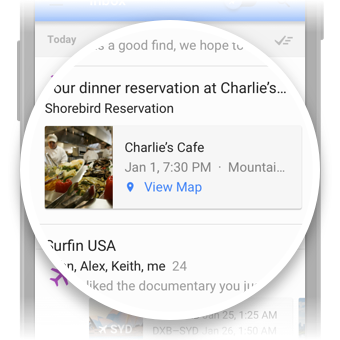
Specifically, you can now take advantage of a new feature called Highlights.

Exactly like it sounds, Highlights “highlight” or surface key information and actions from an email and display them as easy-to-see chips in the inbox. For example, if you’re an airline that sends flight confirmation emails, Highlights can surface the “Check-in for your flight” action and display live flight status information for recipients right in the user’s main list. The same can apply if you send customers hotel reservations, event details, event invitations, restaurant reservations, purchases, or other tickets. Highlights help ensure that your recipients see your messages and the important details at a glance.

To take advantage of Highlights, you can mark up your email messages to specify which details you want surfaced for your customers. This will make it possible for not only Inbox, but also Gmail, Google Now, Google Search, and Maps to interact more easily with your messages and give your recipients the best possible experience across Android, iOS and the web.

As an example, the following JSON-LD markup can be used by restaurants to send reservation confirmations to their users/customers:
<script type="application/ld+json">
{
"@context": "http://schema.org",
"@type": "FoodEstablishmentReservation",
"reservationNumber": "WTA1EK",
"reservationStatus": "http://schema.org/Confirmed",
. . . information about dining customer . . .
"reservationFor": {
"@type": "FoodEstablishment",
"name": "Charlie’s Cafe",
"address": {
"@type": "PostalAddress",
"streetAddress": "1600 Amphitheatre Parkway",
"addressLocality": "Mountain View",
"addressRegion": "CA",
"postalCode": "94043",
"addressCountry": "United States"
},
"telephone": "+1 650 253 0000"
},
"startTime": "2015-01-01T19:30:00-07:00",
"partySize": "2"
}
</script>

When your confirmation is received, users will see a convenient Highlight with the pertinents at the top of their Inbox, then can open the message to obtain the full details of their reservation as shown above.

Getting started is simple: read about email markup, check out more markup examples, then register at developers.google.com/gmail/markup and follow the instructions from there!


by Shalini Agarwal, Product Management, Inbox by Gmail
Read More..

The importance of teachers and stories in the life of a reader

| 0 comments |


Editors note: Through his work with Reading Rainbow, LeVar Burton continues to inspire generations of students to love reading. Getting an early start on celebrating Teacher Appreciation Week, we asked LeVar about educators that inspired him. He shares some stories from his childhood in today’s guest post, and he’ll share more during his keynote, “The power of storytelling to inspire students,” during our Education on Air conference. Register today and tune in for LeVar’s talk on May 8th at 11:15am ET.

Teachers seem to run in my family. My elder sister, my son and two nieces are all educators, and my mother, Erma Gene Christian, was a high school English teacher before becoming my first teacher. I know firsthand how hard these unsung heroes work, and especially how important a teacher can be in a child’s life.

One of the most indelible memories from my childhood happened one day when I was learning to read. My favorite aunt Hope, my mother’s youngest sister, was visiting from Kansas City. We were sitting together in a chair in the living room and I was reading aloud while my mother listened from the kitchen where she was preparing a family meal. Things were going fine until I got stuck on a word. I stopped cold in the middle of a sentence. The word was one I thought I knew, but I didn’t yet have the inner confidence to know that I could read it. I will never forget the infinite patience that Aunt Hope displayed and the gentle nudges of support she gave me. “Go on,” she’d whisper, “You know this word. I know you can sound it out.”

I still remember the word —it was “pretty” — and when my aunt finally said the word to me it was a revelation. She gave me the confidence I needed to trust myself; to trust that I did know these words. I was a reader. This is what teachers do for their students every day.

It’s from my mother, Erma Gene, that I learned the allure of storytelling. Throughout my childhood, mom always had several books going simultaneously, switching from one to the other seamlessly, deriving pleasure from each turn of the page, no matter what the genre. I learned from my mom—and eventually from my own experiences reading, and from exposing children to the joy of books through Reading Rainbow—that storytelling is an elemental part of the human experience, regardless of whether the medium is a print book or a digital book. We know that kids are reading more than 200,000 books a week on the Reading Rainbow App. They are using their devices not just for games or movies, but to read.
Heres me with the first educator who inspired me, my mother.
Children are drawn to stories, and with good storytelling we can teach kids anything. I have seen the light go on in a child’s eyes when he or she falls in love with a story. I’ve seen that light get brighter when they realize that they can read the stories for themselves. This light is the beginning of a lifelong love of reading, and from there a lifelong love of learning. For me, literacy means freedom, and literacy begins with storytelling. You get a child’s attention when you give them a good story. If we fail to take advantage of this, we are letting the opportunity of a lifetime—of our lifetime and theirs—pass us by.

Hear more about the power of storytelling from LeVar Burton during his Education on Air keynote on May 8 at 11:15am ET or check out his Reading Rainbow website.
Read More..

Limit EditText to accept signed decimal numbers only in xml and java

| 0 comments |

layout/activity_main.xml
<?xml version="1.0" encoding="utf-8"?>
<LinearLayout


android_layout_width="match_parent"
android_layout_height="match_parent"
android_padding="16dp"
android_orientation="vertical"
tools_context=".MainActivity">

<TextView
android_layout_width="wrap_content"
android_layout_height="wrap_content"
android_layout_gravity="center_horizontal"
android_autoLink="web"
android_text="http://android-er.blogspot.com/"
android_textStyle="bold" />

<EditText
android_id="@+id/edittext1"
android_layout_width="match_parent"
android_layout_height="wrap_content"
android_inputType="numberSigned|numberDecimal"/>
<EditText
android_id="@+id/edittext2"
android_layout_width="match_parent"
android_layout_height="wrap_content"/>

</LinearLayout>


MainActivity.java
package com.blogspot.android_er.androiddecimalnumberedittext;

import android.os.Bundle;
import android.support.v7.app.AppCompatActivity;
import android.text.InputType;
import android.widget.EditText;

public class MainActivity extends AppCompatActivity {

@Override
protected void onCreate(Bundle savedInstanceState) {
super.onCreate(savedInstanceState);
setContentView(R.layout.activity_main);

EditText editText1 = (EditText)findViewById(R.id.edittext1);
EditText editText2 = (EditText)findViewById(R.id.edittext2);
editText2.setInputType(InputType.TYPE_CLASS_NUMBER
| InputType.TYPE_NUMBER_FLAG_DECIMAL
| InputType.TYPE_NUMBER_FLAG_SIGNED);
}
}

Read More..

One year in and just getting started

| 0 comments |


What’s in a name? Last September, when we changed our name from Google Enterprise to Google for Work, it wasn’t just about what we call ourselves – it was about what we stand for. We want to build great products that help you with every aspect of your life  including work (where many waking hours are spent).

Enterprise is old business. We believe in a new way of working with collaboration at the core. A world where we work how we choose. Where getting stuff done in the office doesn’t feel like traveling back in time. Where our work tools are just as good or even better than the ones we have in our personal lives.

We bring the best of Google to work. The same cloud computing infrastructure that we use to run our search engine; powerful apps and services to help you get work done  fast; simple, secure platforms to access everything, wherever you are.

While we have much more in store, it’s been a busy year and we’ve hit some great milestones over the last twelve months:

  • More than one million paying organizations are actively using Google Drive, including companies like The New York Times, Uber, Fossil, Wedding Wire and BBVA.
  • Google Apps for Work is proving to be the next generation tool of choice: according to a Better Cloud study, Millennials (aged 18-34) are 55% more likely to use Google Apps than alternatives. It’s cost effective, too: Forrester Research’s Total Economic Impact calculator shows that companies using Google Apps see a 304 percent return on investment.
  • We’ve introduced groundbreaking new services with Google Cloud Platform, such as Nearline and Cloud Bigtable for storage and Kubernetes, an open-source container orchestration system. In total, we’ve added over 30 products to our stack, and our online community has nearly doubled.
  • Chromebooks are now the best-selling device in the US for K-12 education, according to a report from IDC.
  • More than 10,000 companies are testing, trialling and using Android for Work following its launch in February. In July, we added carriers such as AT&T and Verizon to our partner program and introduced a new class of devices for regulated industries, like the Blackphone by Silent Circle and Samsungs KNOX devices.

And the best is yet to come. Cloud computing will continue to get more powerful, and we’re only at the beginning of what machine learning can do to help businesses and people contextualize data.

Imagine an even smarter digital assistant that can surface the information you need at just the right time and help you manage your schedule for stress-free productivity. Virtual reality products, such as Expeditions, are going to help us learn and work in exciting new ways. And finally, more and more of the objects around us will connect to the internet, enabling more efficient information transfer and actionable data for businesses than ever. These advances will affect all aspects of our lives, including work, and the possibilities are great. We’ll keep our focus forward, so that wherever we’re going, we’re always embarking on what’s next.
Read More..

IT makes a difference in improving patient care at Wyoming Medical Center

| 0 comments |


Editors note: Today’s guest author is Rob Pettigrew, Information Technology Director at Wyoming Medical Center — the first hospital in the United States to go Google. See what other organizations that have gone Google have to say.


As the IT team at a medical facility, we’re here to help caregivers keep people healthy. Google Apps for Work provides superb reliability and security so we can empower our 1,219 staff members and 233 partner physicians to provide exceptional care. The IT team can now focus on maintaining and improving nearly 200 clinical applications that support services such as cardiology and neurological specialties, instead of worrying about email maintenance.

This is especially important in a rural setting like ours. The state has only about 600,000 people spread over 100 square miles, and we serve as a hub of medical expertise. Even with only 217 beds, we can offer the same services as many larger hospitals by working efficiently. In 2014, we saw 9,000 patients, conducted 5,000 surgeries and welcomed 1,200 new babies into the world.

We previously used Novell GroupWise for calendaring and email, but it was expensive, difficult to support and suffered frequent outages. My crew often spent many late hours trying to get GroupWise working after a server outage. We considered other alternatives. Microsoft SharePoint was too expensive, as were dedicated applications for telemedicine and video conferencing. Microsoft’s cloud offering was a possible contender for email, but it was much more expensive and a less mature product than we would have liked. We made up our minds that Google was the way to go. We trusted their exceptional security and privacy procedures and signed on.

Switching to Google Apps has resulted in six figure savings year after year, including decommissioning multiple physical servers. The flexibility of Google Apps helps us collaborate in ways we never could before. Google Hangouts has helped us advance the quality and reach of care. Now clinicians in remote areas can get advice from specialists, such as our neurosurgeons and cardiologists, helping us spread the wealth of expertise across the state, We also use Google Hangouts to streamline the recruiting and hiring process. Candidates submit resumes by Gmail, and HR staff interviews potential hires via Hangouts.

Nurses also use Google Apps to communicate instantly. With Google Drive and Google Docs they discuss and share data on topics such as medication delivery, credentials, blood-borne pathogens, education and so on. With Google Groups, the medical center uses SMS email addresses to communicate directly to users’ cell phones for staffing requests, trauma calls and other communications that require instant responses.

Much has changed since I joined Wyoming Medical Center in 2006. When I started in 2006, reporting and spotting trends was difficult because data was trapped in rigid enterprise systems such as our electronic medical records (EMR) and human resources (HR) software. Today, we can surface and report on large blocks of data from our electronic medical records and HR databases by using Google Sheets. This agility is a big win for strategic activities like spotting population health trends. It’s clear that Google Apps has been among the most positive shifts in helping our IT team make greater contributions that further the health and well-being of people across Wyoming.

Read More..

New in Classroom saving time while grading

| 0 comments |


(Cross-posted on the Google for Education Blog.)

We built Classroom to save teachers time, and we know that grading is one of those tasks that can involve a lot of little time wasters. In fact, students have turned in more than 200 million assignments via Classroom to date, which adds up to a lot of grading hours. Today, we’re launching new features to help make grading a little faster and easier.

  • Export Grades to Google Sheets: In addition to .csv files, you can now export your grades directly to Google Sheets. The Sheets template includes a class average and an average per student. If you have ideas about how we can make this export to Sheets even more useful, please leave us feedback by clicking the question mark at the bottom left of the Classroom page, then choosing “send feedback.” 
  • Easier to update grade point scale: We know not all assignments are out of 100 points. Youve always been able to change the point value, but a lot of teachers had trouble finding this feature. So we’ve made it easier to change the grading scale to any number you need it to be. 
  • Keyboard navigation for entering grades: When you’re entering lots of grades, you need a fast way to navigate from student to student. We’ve added the ability to use the up and down arrows to move directly from the grade entry area for one student to another. 
  • Sort by name on grading page: In addition to sorting students by completion status (done, not done), you can now sort by first or last name. 
  • And in case you missed it last month, you can now add a private comment for a student when you’re returning their work. 

In addition to these grading improvements, we’ve been hard at work on other updates. We’ve polished the look and feel of Classroom on the web with icons to help differentiate items in the stream and added a cleaner look for comments and replies. We’ve also recently updated our Android and iOS mobile apps, so they’ll now load even faster. You can post questions for students on the go, and Android teachers can reuse previous posts. Finally, you can now post a question from the Classroom Share Button, which you can find on some of your favorite educational websites.

We hope you’ll find these updates helpful, and you’ll get a chance to relax and refresh over the winter break (or summer, for our friends in the Southern Hemisphere). Look for more Classroom updates next semester.
Read More..